
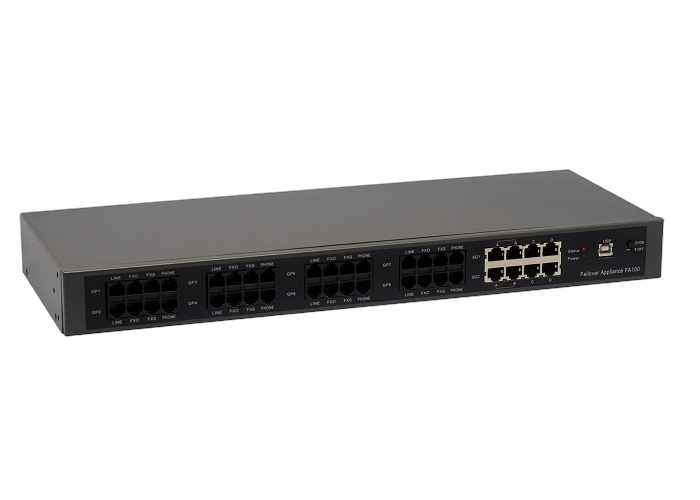
Use FXO Failover where the protected route is analog and FA100 is the relevant device path.
Failover
OpenVox Failover hardware helps protect voice continuity when an analog or digital line path needs a dedicated fallback device. Start by matching the protected interface type, then review the exact deployment path with OpenVox.
Choose the failover path by protected line type.
FXO Failover is the analog protection path for deployments that use FA100 to preserve a fallback route for PSTN-facing voice continuity.
- Protected Interface
- Analog / FXO
- Representative Model
- FA100
- Hardware Category
- FXO failover hardware
- Line Environment
- PSTN-facing analog voice lines
Map protected line type, device path, fallback role, and deployment review before choosing failover hardware.
Failover selection starts with the protected voice path, then aligns hardware direction, continuity expectations, and deployment validation.
Use the FD series path when the deployment protects digital span or BRI-facing lines.
Frame the product around line-side continuity and the protected voice path.
Review wiring, protected path, and expected behavior as part of deployment design.
Match failover hardware to the protected voice path.
Use the line type as the first decision: FA100 for FXO-oriented analog protection, or FD series paths for E1/T1/BRI continuity requirements.
FXO Failover
Analog failover path for deployments that need FA100-oriented fallback hardware for PSTN-facing line continuity.
- Analog / FXO protection
- FA100 hardware direction
- PSTN-facing fallback route
E1/T1/BRI Failover
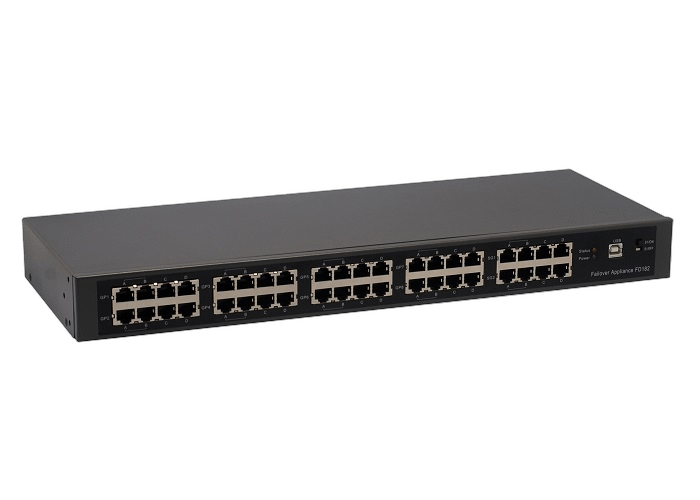
Digital failover path for deployments that need FD series protection around E1, T1, or BRI voice lines.
- Digital line protection
- FD140 / FD142 / FD180 / FD182
- E1/T1/BRI continuity
Failover capabilities for voice continuity projects.
Failover hardware gives continuity-sensitive deployments a clearer device path for analog or digital line protection.
FXOAnalog path
Analog Line Protection
Use the FXO Failover path when the protected line environment is analog and FA100 is the right hardware direction.
- Use the FXO Failover path when the protected voice route is analog and FA100 is the relevant hardware direction.
- This path is appropriate for projects that need a clear analog fallback story.
Proof chips
- FXO Failover
- FA100
E1/T1Digital path
Digital Line Protection
Use the E1/T1/BRI Failover path when continuity depends on digital span or BRI-facing voice lines.
- Use the E1/T1/BRI Failover path when digital span or BRI-facing continuity is the design driver.
- FD140, FD142, FD180, and FD182 are the model names preserved from the source taxonomy.
Proof chips
- FD140 / FD142
- FD180 / FD182
HWDedicated device
Continuity-Oriented Hardware
Select dedicated failover hardware where line protection is a deployment requirement rather than a general routing preference.
- The category is positioned around dedicated failover hardware, not general call-routing software.
- Selection should focus on the line type and protected path before detailed device review.
Proof chips
- Line-side protection
- Dedicated failover branch
2Protected paths
Deployment Review
Review line type, wiring, and expected fallback behavior before procurement in continuity-sensitive projects.
- Continuity-sensitive projects should align expected behavior with OpenVox before deployment.
- This avoids overstating capabilities that depend on the final line environment.
Proof chips
- Protected line type
- Switchover expectations
Key considerations for failover hardware selection.
Choose failover hardware by protected line type, continuity goal, and the physical voice path it must preserve.
Protected line type
- FXO Failover path for FA100 analog fallback deployments
- E1/T1/BRI Failover path for FD140, FD142, FD180, and FD182
- Selection starts with the protected interface type
- Dedicated failover hardware sits outside ordinary routing features
Continuity design
- Preserve a voice route when the primary path is interrupted
- Match failover hardware to analog or digital line environments
- Protect line-side continuity in branch and service-sensitive deployments
- Review call-path expectations before procurement
Deployment review
- Confirm line type, PBX or gateway role, and physical connection requirements
- Validate expected switchover behavior against the real deployment path
- Use OpenVox support for continuity-sensitive sites
- Keep claims tied to the selected failover device and line environment
Failover Deployment Scenarios
Failover hardware fits projects where voice-line continuity must be protected with a dedicated analog or digital hardware path.
Deployment pattern
Analog PSTN-facing fallback
This scenario keeps the story focused on PSTN-facing analog protection and device-level fallback review.
Compare failover hardware paths by protected line type
Use this matrix to compare real failover hardware differences before selecting FA100 or an FD-series model.
| Specification | FXO Failover | E1/T1/BRI Failover |
|---|---|---|
| Interface Hardware | ||
| Models | FA100 | FD140 / FD142 / FD180 / FD182 |
| Protected Ports | 8 analog standby PSTN ports + 2 T1/E1/BRI/Ethernet ports | FD140 / FD142: 4 E1/T1/BRI ports; FD180 / FD182: 8 E1/T1/BRI ports |
| Ethernet Ports | Included in the 2 T1/E1/BRI/Ethernet interface group | FD142 / FD182 include 2 Ethernet ports |
| System Integration | ||
| Host Connection | USB Type-B, USB 2.0 / 1.1 compliant | USB Type-B, USB 2.0 / 1.1 compliant |
| Power | Powered from USB bus | Powered from USB bus |
| Watchdog | Hardware watchdog supported | Hardware watchdog supported |
| Mounting | Rack / wall mountable | FD142 / FD182 list rack / wall mount support |
| Physical And Software | ||
| Dimensions | 44cm x 6.6cm x 4.5cm | 44cm x 6.6cm x 4.5cm |
| Weight | FA100: 1387g | FD140 / FD142: 1458g; FD180 / FD182: 1658g |
| Asterisk Integration | Controlled by Asterisk res_failover.so module | Controlled by Asterisk res_failover.so module |
| Warranty | Five-year warranty | Five-year warranty |
Resources for failover hardware evaluation.
Use these paths to compare the protected-line options and request support for continuity-sensitive projects.
Selection
Path Comparison
Compare FXO Failover and E1/T1/BRI Failover by protected interface type and representative models.
Compare paths
Analog
FXO Failover Review
Review FA100-oriented analog fallback requirements before procurement.
Review analog path
Support
Continuity Review
Share protected line type, wiring, and fallback expectations so OpenVox can guide the device path.
Request review
Sales
Project Consultation
Discuss failover hardware selection for branch, PBX, and protected-line deployments.
Contact sales